HP-01: Detecting Cars From Traffic Cameras
Preface #
This post is the first in a series I plan on creating about small hobby projects I am working on this summer. “Hobby Programming” serves as a medium for me to record these projects so I can reflect on them in the future.
One of the primary motivations I see for personal programming projects is for learning new-to-me technologies. Frequently, I find that the most effective way to learn a new concept independently is to tie it into some project. Consequentially, the purpose of many of these projects will be to learn and explore some different topics.
These projects will likely be fairly short in scope, each probably no more than a week long. I will try to get at least one of these posts out each week.
Intro #
I feel that many people are unaware of the traffic information services that their state government provides. While signs along highways direct drivers to either tune their AM radio to a specific Traveler Information Station or call a phone number for traffic information, I can’t think of a time that I have seen anyone pay much attention to them. This notion is supported by how surprised people are when shown that anyone can view live feeds from traffic cameras mounted across the state’s highways! This data all comes from the state’s department of transportation, who publicize traffic information, message board text, and even live traffic camera feeds.
Most relevant to me is 511 Virginia, and will be the primary focus in this discussion. On their website they host an interactive map where you can scroll around and view traffic information from across the state, as well as live video from traffic cameras positioned along highways.
Project Idea #
The goal of this project was to investigate video streaming and computer vision concepts to try and detect patterns in traffic flow over time. Ideally, I would write a program that can fetch some video from the VDOT 511 traffic cameras, count how many cars are in the frame, and export the data. After writing a program that accomplishes this task, I could then set up a Raspberry Pi to automatically run the script throughout the day. After some time for data collection, I could work on analyzing the data and look for patterns.
I had not looked at computer vision before, but I was interested to learn about it, so I felt that this project could be a good motivation to learn about computer vision, specifically making use of python and OpenCV.
Streaming Video #
The first step to this project was to do some research on the VDOT 511 video feeds to see if it was possible for me to stream the video directly from the website using a python program. To figure this out, I decided to start by digging through the 511 Virginia website to look for how they include the video source on their page. I opened up a traffic camera on the 511 Virginia map view page, and started looking for a video element in the HTML. Making use of the pick an element from the page tool, I quickly found the following tag:
<video id="vjsPlayer_html5_api" controlbar="false" oncontextmenu="return false;" inactivitytimeout="0" preload="none" type="application/x-mpegURL" muted="muted" class="vjs-tech" tabindex="-1" playsinline="playsinline" autoplay="" poster="" src="blob:https://511.vdot.virginia.gov/91ac0ee7-2d2d-4c87-bee5-ad661471f5c7"></video>
I have basically no experience with video on websites, and I have no experience with a video stream, so I decided to ask Google’s Gemini chatbot for some help. To my surprise, it identified that the website was using “HTTP Live Streaming”(HLS), and that the URL listed in the video tag was likely not going to be helpful for me. Gemini directed me to look in the network requests on the page for a .m3u8 file, a type of index file used in HLS which directs the client to the individual .ts segments of the video stream.
I was able to use the Firefox dev tools to find the URL of the m3u8 playlist file in the network requests. Gemini was able to show me how OpenCV can be used to stream from a HLS source, generating the following initial program.
import cv2
import time

stream_url = "https://media-sfs6.vdotcameras.com/rtplive/FairfaxVideo1055/chunklist_w2012168288.m3u8"

cap = cv2.VideoCapture(stream_url)

if not cap.isOpened():
    print("Error: Could not open video stream.")
else:
    print(f"Successfully opened stream: {stream_url}")
    frame_count = 0
    while True:
        ret, frame = cap.read()
        if not ret:
            print("Failed to read frame or end of stream. Retrying in 5 seconds...")
            time.sleep(5) # Wait a bit before retrying in case of temporary stream issues
            cap = cv2.VideoCapture(stream_url) # Attempt to re-open the stream
            if not cap.isOpened():
                print("Error: Could not re-open video stream. Exiting.")
                break
            continue # Skip to next iteration to try reading frame again

        frame_filename = f"frame_{frame_count:05d}.jpg"
        cv2.imwrite(frame_filename, frame)
        print(f"Saved {frame_filename}")

        # Display the frame (optional)
        cv2.imshow('Traffic Camera Feed', frame)

        # Wait for 1 millisecond and check for 'q' key press to exit
        if cv2.waitKey(1) & 0xFF == ord('q'):
            break

        # To control the rate of frame saving (e.g., save one frame every 5 seconds)
        time.sleep(5)
        frame_count += 1

    cap.release()
    cv2.destroyAllWindows()
To my surprise, this code worked perfectly! Honestly, I was a pretty surprised that in less than 20 minutes I was able to be streaming video from a network source directly in python, with a little help from AI. I think that this application demonstrates a really useful use case for AI, where I need some help with a technical topic that I don’t know much about. It was able to piece together what I was asking for and come up with a working solution! That said, this is only the first part of the battle.
Car Recognition #
I wanted to explore AI and computer vision topics in my quest to figure out how to identify cars in a frame, but because I didn’t have any experience in the field, I had to start with some research
I started by looking for examples where people have solved similar problems. I found a few interesting projects that I used for inspiration.
- This article by Hamed Etezadi, which uses a Cascade Classifier to detect vehicles
- This article by Andrés Berejnoi, where he background subtraction to extract motion and count vehicles
- This dataset from Baris Dincer which could be used to train my own model or to look at models created using the dataset
From this short bit of research, it seemed like a Cascade Classifier could be one of the easiest methods to try first, but the motion extraction technique also looked very interesting.
Cascade Classifier #
One advantage I saw to using a cascade classifier was that it is built in to OpenCV, which I was already using. After reading the cascade classifiers tutorial from OpenCV, the process by which the detection worked was still unclear, but it seemed like I wouldn’t really have to figure it out if I just found a pre-trained classifier. After doing some digging online, I was able to find a classifier .xml file on this repo from Andrews Sobral. Armed with a pre-trained model, I was able to start writing some code.
I started by working from a single image saved from the stream, as provided by the code that Gemini created. I followed the sample implementation from the OpenCV tutorial, but my results were underwhelming. For whatever reason, it was not detecting any cars in the image.
I turned to the article from Hamed Etezadi, in which he also uses a cascade classifier to detect cars. Etezadi focuses a large section of the article on the preprocessing that happens before the detection can take place. So far, the only processing I was doing was converting the image to black and white, but Etezadi describes applying a handful of other transformations on the image before attempting the detection.
These steps included the following.
- Blurring the image to reduce noise.
- Dilating the image to accentuate foreground features.
- MorphologyEx to enhance the definition of objects in the image.
Another key difference that I noticed was that the images he was using were much higher resolution. The video frames from the VDOT cameras are only 320x240, whereas the stock image that Etezadi was using has a resolution of 931x524. Additionally, their image is closer to the cars than most of the traffic cameras are.
I pressed on, but using their stock photo just to try to replicate their results. Without any of the preprocessing, the classifier was very ineffective, but after adding the additional processing, the classifier could find about 24 cars in the frame. I was pretty surprised how making the image look, to me, blurry and unclear massively helped the classifier to detect objects. I next tried it with my own images from the VDOT cameras, but I once again got underwhelming results. I decided to try and write some code to scale up the image to see if that improved detection, and it did help. Unfortunately, it was still inconsistent and it really seemed like lots of fine tuning the image processing would be the real way to effectively make the classifier detect cars more reliably.
Motion Extraction #
When I saw Andrés Berejnoi’s article on detecting vehicles using foreground isolation and motion detection, I was very intrigued. I too inspiration from the article and decided to try and replicate his results. For one, my use case where the cameras are primarily on the highway would make the motion extraction technique fairly applicable, especially since the cars may be too small or not have enough detail in the image for an AI model to recognize them.
I used the OpenCV BackgroundSubtractorMOG2, which seemed to work fairly well for this small experiment. Once again, I followed the tutorial from OpenCV, and I thought the results were very interesting.
I was able to get a matte of all of the areas in the image that changed from the background. I think it is really cool how it doesn’t need a pre-made background image, and it can just figure out what has changed automatically at runtime. From there, I also decided to try and have it cut out only the parts of the image that it detected motion in. I solved this by using OpenCV’s bitwise_and function.
This left me with a pretty cool result where you could see only the parts of the image that were moving, and everything else was all black. I thought that this could be used to make the vehicle detection easier. I thought that if the image recognition algorithm only got fed with the parts of the image that most likely have cars, then it would be better at finding the cars. I improved the result by using cv.dilate() to expand the mask to include more area around the cars.
One issue that this could solve if used in conjunction with the cascade classifier are false positives found in the backgrounds of images. By extracting only the moving parts of the image, that would get rid of those anomalies. It also could open the door to doing more processing on the image to improve detection, or upscaling the areas that have movement to get better results.
Putting it together #
At this point, it didn’t really feel like the idea of creating a system that could track traffic flow patterns was going to work out. The car detection was just too unreliable to give an accurate count, but I decided to press onwards anyways. I shifted my focus to see what the detection data would look like when in real-time when shown on the images and to flesh out my python programs.
I separated the code out into 3 files, a vdot_cameras.py containing the code that can pull frames from the cameras, a detection.py for image processing and car detection, and a main.py that orchestrated the whole show. I used argparse to add command line arguments to make the program easy to use. I had noticed that the URL’s for the VDOT camera feeds seemed to follow a consistent format, so I created command line args so a user can decide which camera to use.
The files for this version of the program can be found in this github repository
Diving back into HLS for a second, there was another detail I wanted to flesh out. It looked like the client first requests a playlist.m3u8 file which links to a chunklist file. The chunklist files had a long number in their title, which looked like it could be some unique identifier that I was worried may change over time. As I don’t have any experience with HLS outside of this project, I wanted to have my program automatically find the url for the chunklist at runtime. This would have it request the playlist and then parse out the chunklist file. I once again turned to Gemini for this task, and it provided me with another short snippet of code that worked well right out of the box.
The process for finding the URL for a camera is still sub par. You have to open up the 511 Virginia map and select a camera, then while it is streaming you can open the dev tools, go to the network tab and filter by requests with the domain “vdotcameras.com/rtplive”.
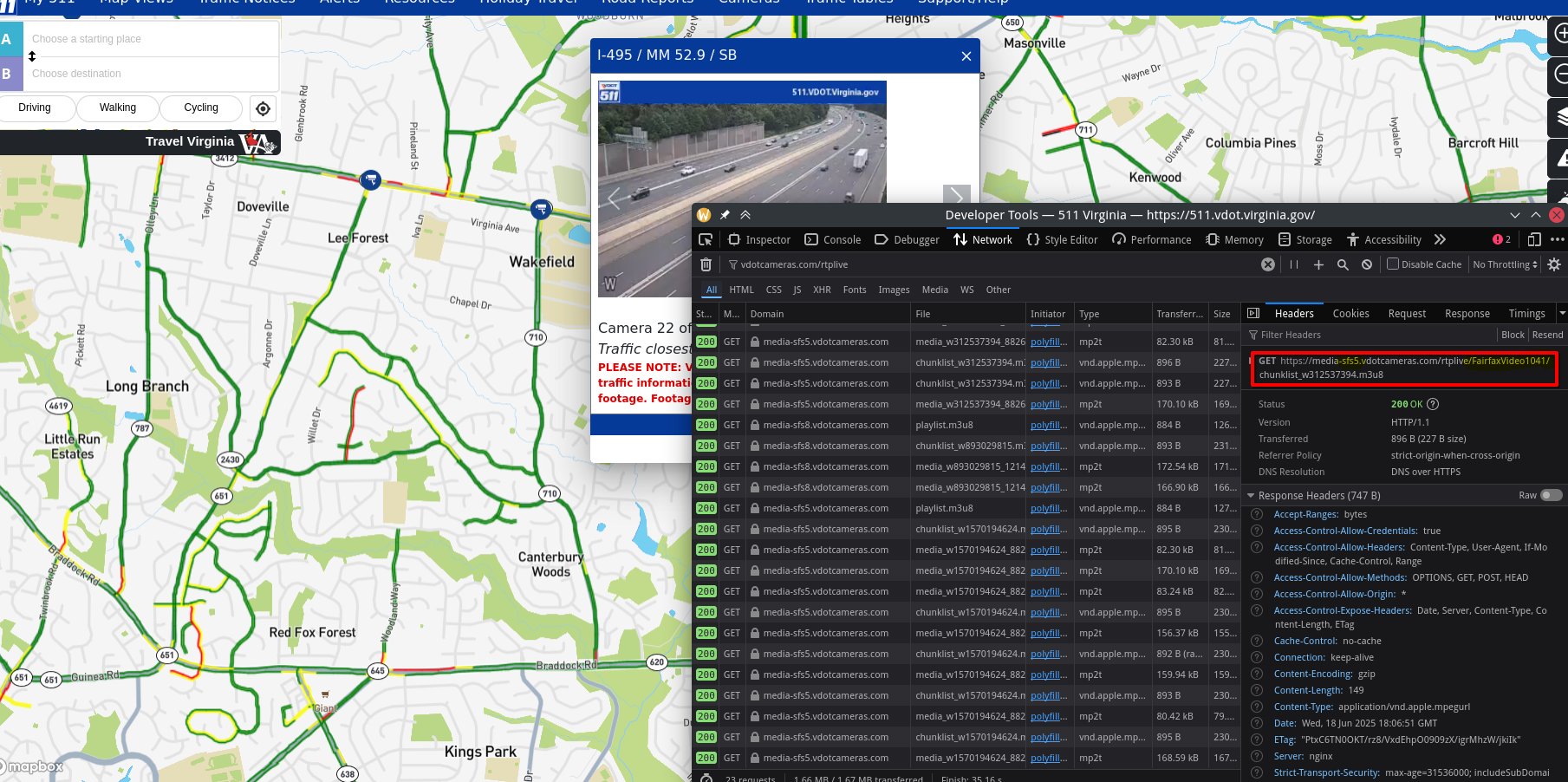
The important information is the number that follows media-sfs, which I think refers to some zone or just is an identifier associated with a group of cameras which in this case is 5, and the name of the camera, in this instance FairfaxVideo1041.
The most interesting version of my program is the “video mode”. This pulls live video from a traffic camera in real time. I have it show the up scaled image feed from the camera with the cars from the cascade classifier marked on the image in red. I also have it show just the foreground mask, the foreground from the video, and the detected cars from the masked video in green.
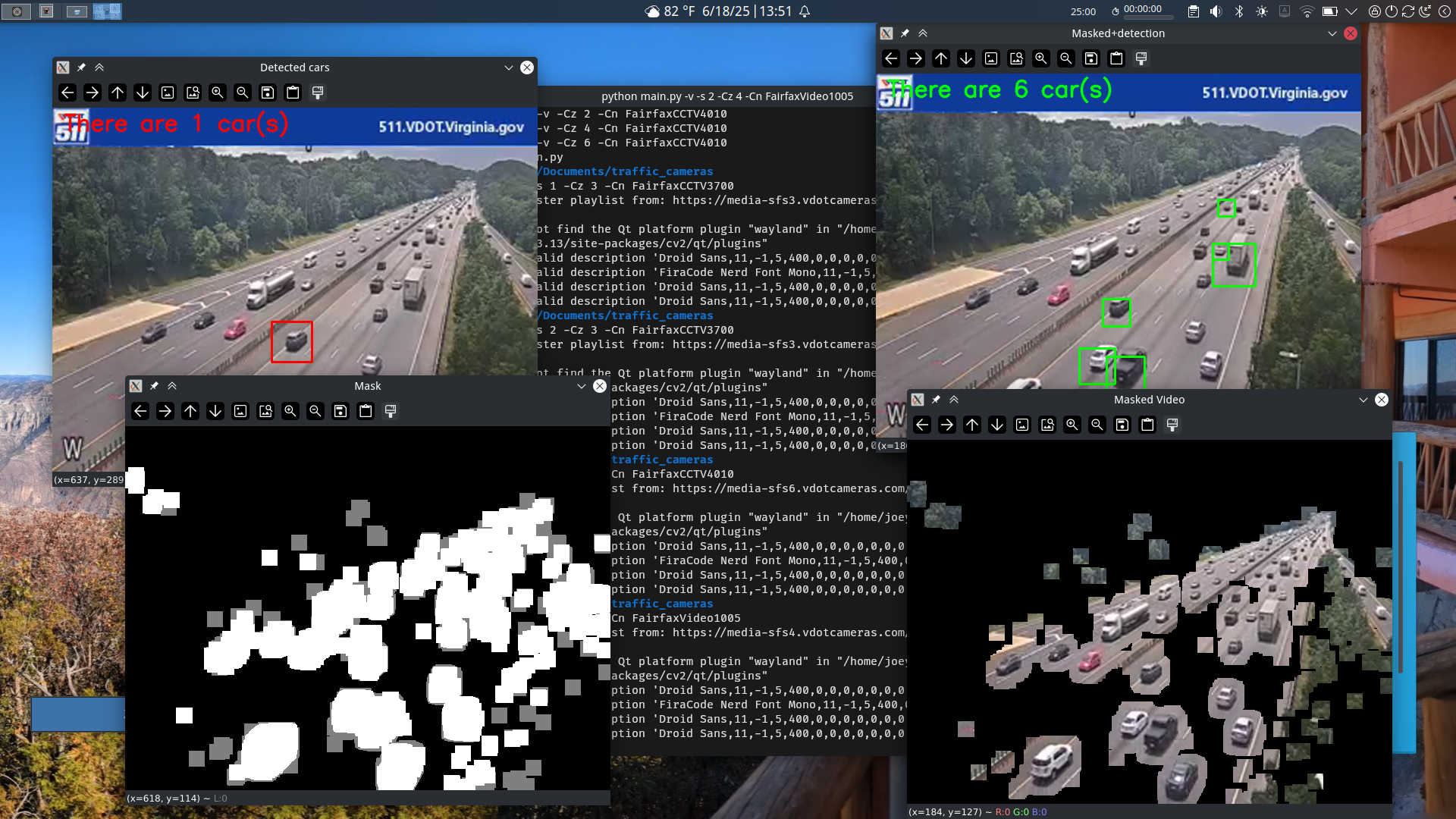
Looking at various feeds using this mode showed me that my assumptions that cutting out only the movement did improve detection, but neither mode can reliably identify all the cars out of any given frame.
Conclusion #
I think that there are many possible ways I could improve this project or adapt it in the future. I could try to find a different model for the cascade classifier, one that is more suited for traffic camera video feeds. I could also possibly try to train my own classier using video from the VDOT traffic cameras.
Alternatively I could try a different type of image recognition algorithm or I could lean more into the motion detection side of the project. I could look more at the work by Berejnoi and adapt their work to feed from the VDOT cameras. Another way I could use the motion data is by detecting when a point on the edge of the frame or somewhere on the road transitions from black to white in the image, indicating that a car has passed.
While I didn’t get to exactly what I wanted when I started, I think I still reached an interesting conclusion. I think the final state the program is at is pretty cool, and I think that the motion extraction is really neat. I learned a lot about streaming video in python as well as how to make use of OpenCV to modify images and do some object detection. I think it is really cool how I now have a system built to get images automatically from the VDOT traffic cameras. Overall, I felt like I learned a lot from this project and I think I will probably revisit it soon.